CarPlay options
Portable CarPlay screen or a new head unit?
Three ways to get Apple CarPlay or Android Auto in an older car: a portable screen, a new head unit or a wireless adapter. Fitting, sound, cost and the rules.
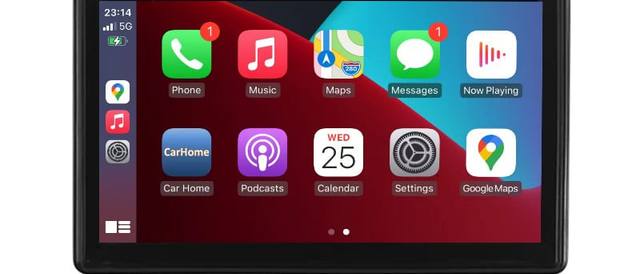
Apple CarPlay and Android Auto put your phone's maps, music, messages and calls on a screen in the car, with large buttons and voice control. Most new cars have one or both. If yours does not, or only works with a cable, there are three ways to get it:
- a portable CarPlay screen that sits on the dashboard,
- a new head unit that replaces the radio,
- a wireless adapter, if your car already has wired CarPlay or Android Auto.
This guide compares them so you can pick the right one for your car.
What you need on the phone side
Whatever you choose, the phone does the work. A few requirements from Apple and Google:
- CarPlay: Apple's setup steps say to make sure Siri is turned on, and that your country or region supports CarPlay. The UK does.
- Android Auto: Google lists a phone with Android 11 or higher and an active data plan for a USB connection. For wireless Android Auto it lists a compatible phone with 5 GHz WiFi support.
Your phone also needs mobile data for live maps, streaming and messages. The screen or head unit itself does not.
Option 1: a portable CarPlay screen
A portable screen is a touch screen on a mount. It plugs into the 12V socket for power and connects to your phone, usually without a cable. The car does not know it is there.
How the sound gets to your speakers. This is the part to check before you buy. There are three routes:
- FM transmitter: the screen broadcasts the sound on a free FM frequency, and you tune your car radio to it. It works in almost any car with a radio. Sound quality depends on finding a clear frequency, which can change on a long drive.
- AUX cable: a 3.5 mm cable from the screen to the AUX input of your car stereo. The clearest option, if your car has the socket.
- Built-in speaker: fine for navigation prompts, thin for music.
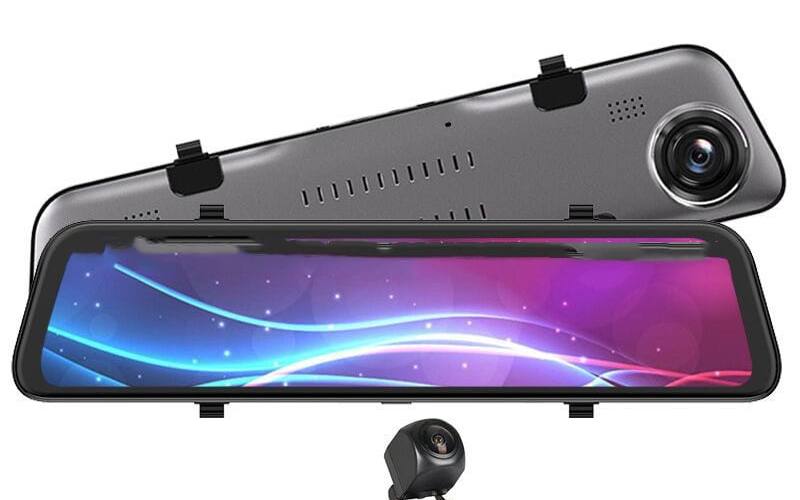
Our 7-inch CarPlay screen with FM transmitter lists all three, plus Bluetooth 5.0 and an input for a reversing camera. Our 7-inch portable CarPlay screen is the simpler one: wireless CarPlay and Android Auto on an IPS screen with a 12 to 24V charger, but the supplier does not list its audio outputs. If you also want a dash cam, the 10.26-inch CarPlay screen with front and rear cameras records both ends of the car and lists FM, AUX and a speaker.
Advantages
- No fitting beyond the mount and the 12V cable. Nothing to remove from the dashboard.
- Keeps the car's original radio, steering wheel buttons and any other factory features.
- Moves to another car in minutes, which suits leased cars, company cars and second cars.
- The lowest cost way to get CarPlay into an older car.
Disadvantages
- A cable runs to the 12V socket, and the socket is no longer free unless you use an adapter with extra ports.
- FM sound is not as good as a direct connection.
- The screen sits on top of the dashboard, so you need a place where it does not block your view.
Option 2: a new head unit
A head unit replaces the radio in the dashboard. Aftermarket units with CarPlay and Android Auto come in standard sizes: single DIN (the slot of a traditional car radio) and double DIN (twice as tall), with some larger screens that float in front of the dash.
Advantages
- Built in, with no cable on the dashboard.
- Sound goes straight to the car's amplifier and speakers.
- Often adds extras such as a rear camera input and more audio settings.
Disadvantages
- Fitting. Your car needs the right fascia adapter, a wiring harness to connect to the car's loom, and often an aerial adapter. Many modern cars also need an interface to keep the steering wheel controls working.
- Lost features. In some cars the original screen also controls climate, vehicle settings or a parking camera. Replacing it can mean losing those, or paying for an extra interface to keep them.
- Cost. Add the price of the unit, the fitting parts and professional fitting if you do not do it yourself.
- It stays in the car. If you sell the car, the unit goes with it unless you refit the original.
A head unit makes most sense if you plan to keep the car for years, your original radio is a simple unit with no other functions, and you want the neatest result.
Option 3: a wireless adapter
If your car already shows CarPlay or Android Auto when you plug in your phone with a cable, you do not need a new screen at all. A wireless adapter plugs into the car's CarPlay USB port and makes the connection wireless. Apple notes that some cars support wireless CarPlay directly; for those that only support it with a cable, an adapter adds the wireless part.
Our wireless CarPlay and Android Auto adapter works with both iPhones and Android phones. It does not add CarPlay to a car that does not have it.
Side by side
| Portable screen | New head unit | Wireless adapter | |
|---|---|---|---|
| Car needs | 12V socket | Standard radio slot or a fitting kit | Factory wired CarPlay or Android Auto |
| Fitting | Mount and 12V cable | Dashboard work, often professional | Plug into USB |
| Sound | FM, AUX or built-in speaker | Car speakers directly | Car speakers directly |
| Keeps factory features | Yes | Not always | Yes |
| Moves between cars | Yes | No | Yes, between cars with wired CarPlay |
The rules for screens in the car
A screen in the driver's view is covered by the same rules whichever option you choose:
- What it may show. Regulation 109 of the Road Vehicles (Construction and Use) Regulations 1986 says you must not drive if you can see a screen showing anything other than information about the state of the vehicle or its equipment, its location and the road, a view of the road next to the vehicle, or help to reach your destination. Maps, music controls and camera views are fine. Films and video apps are not. CarPlay and Android Auto do not offer video apps while driving anyway.
- Distraction. Highway Code rule 150 warns that in-vehicle systems such as sat navs and multimedia can distract you, and advises you not to be distracted by maps or screen-based information. Set your route before you set off and use voice control on the move.
- Hand-held devices. Rule 149 says you must not use a hand-held mobile phone or similar device while driving. Leave the phone in your pocket or a holder, and let the screen and voice control do the work.
- Your view. A portable screen must not block your view of the road. The Highway Code says windscreens must be kept free from obstructions to vision. Mount it low, to the side of your line of sight, and away from airbag covers.
Which should you choose?
- Your car has wired CarPlay or Android Auto: a wireless adapter.
- Your car has no CarPlay, and you want a quick, removable solution: a portable CarPlay screen.
- You also want a dash cam: a 10.26-inch screen with front and rear cameras, which combines both.
- You are keeping the car for years and want it built in: a head unit from a car audio specialist, with professional fitting.
For more on recording the road, see Front and rear dash cam or mirror dash cam?.
Frequently asked questions
What is the difference between a portable CarPlay screen and a head unit?
A portable screen sits on a mount on the dashboard or windscreen, runs from the 12V socket and sends sound to the car by FM or AUX. A head unit replaces the car's radio in the dashboard and connects to the car's wiring and speakers, which usually needs professional fitting.
Can I add CarPlay to my car without changing the radio?
Yes. A portable CarPlay screen does exactly that. It works in most cars with a 12V socket and does not connect to the car's own systems.
My car already has CarPlay with a cable. Do I need a screen?
No. A wireless CarPlay and Android Auto adapter turns the wired connection into a wireless one. It plugs into the USB port your car uses for CarPlay.
What phone do I need?
For CarPlay, an iPhone with Siri turned on, in a country where CarPlay is supported. For Android Auto, Google lists Android 11 or higher and an active data plan, and a phone with 5 GHz WiFi for wireless use.